Plans Before Changes
Review the App shape, region, Capacity, and expected cost before Blossom deploys anything.
Let Your Apps Blossom.
Tell your AI agent what you want to run. Blossom creates a clear plan, shows the expected cost, asks for approval, deploys the App, and verifies the result.
Deploy this repository to Blossom as a production App.
Use Blossom's recommended production defaults. Detect its Services and data dependencies, show me the expected cost, and ask before creating paid capacity.
By Tung Nguyen, AWS Container Hero; creator of Jets, Terraspace, and Kubes. About
Clear intent in, healthy Apps out
Review the App shape, region, Capacity, and expected cost before Blossom deploys anything.
Set the boundary. Blossom activates the Capacity your Apps need and retires it when demand returns to zero.
Blossom remembers what should be running, watches what is running, and brings the system back in line.
Health-aware rollouts move one safe step at a time, keeping old containers until replacements are ready.
Connect a repository once. Blossom builds new versions and releases them through the same health-aware path.
Spin up isolated environments for any branch. Test before merging, share with teammates, tear down automatically.
Logs, metrics, Containers, health, and Activity explain what is running and what changed.
Add Databases and Caches through stable private endpoints, with backups and recovery owned by Blossom.
Set retention intent and recover the Product resource without managing host snapshots yourself.
Container-based releases for Ruby, Python, Node.js, Java, .NET, PHP, Go, and more.
Generated endpoints work immediately. Add a custom domain and Blossom keeps HTTPS current.
Choose Blossom Cloud or connect your own cloud account. Apps deploy and operate the same way.
From Ruby to Python, Node.js to Java, and many more - Blossom supports all major programming languages and frameworks.
Rails, Sinatra

Express, Next.js


Django, Flask
Spring Boot, Javalin

Razor Pages, Minimal API
Laravel, Slim

Gin
Http4s
Use Blossom Cloud or connect a supported provider account. The App workflow stays the same.










How It Works
Three calm steps, with approval at the paid boundary
Point Blossom at a repository or image and name the Environment you want.
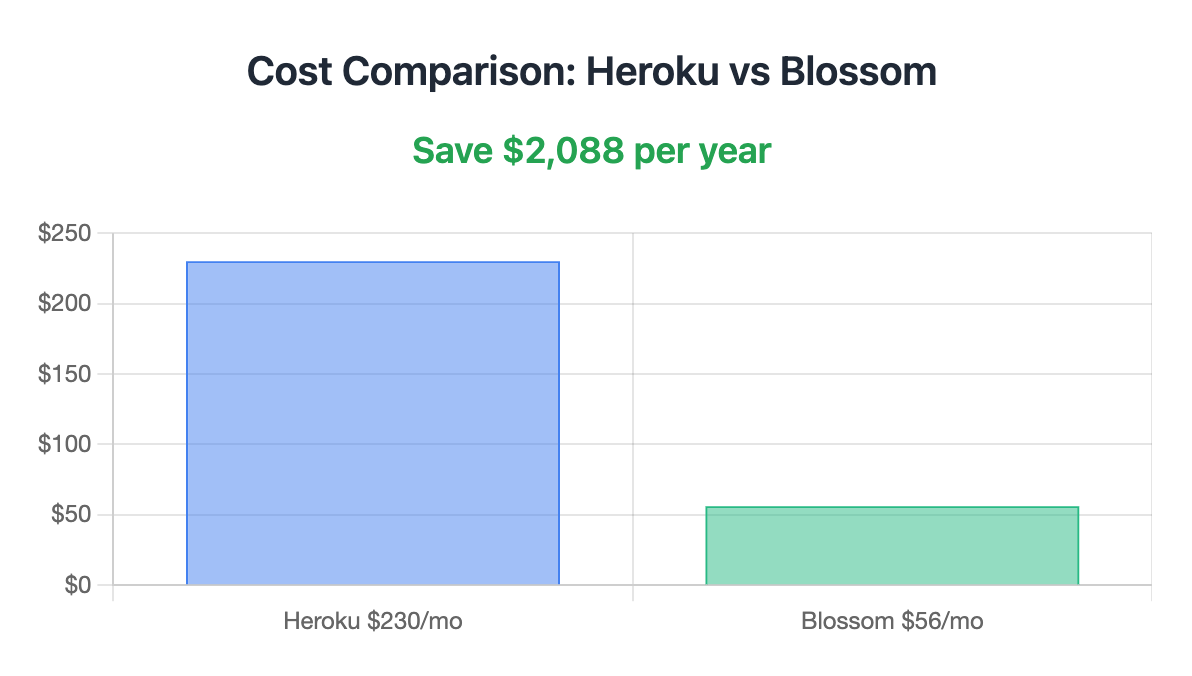
See what Blossom will create, the Capacity it needs, and the expected monthly cost.
Blossom builds, releases, verifies health, and keeps reconciling the intended result.